Fillable Form W-4 (2025)
Complete your IRS Form W-4 online for free. Adjust your federal tax withholding for 2025 with step-by-step guidance and AI-powered assistance from Popform.
USE FORM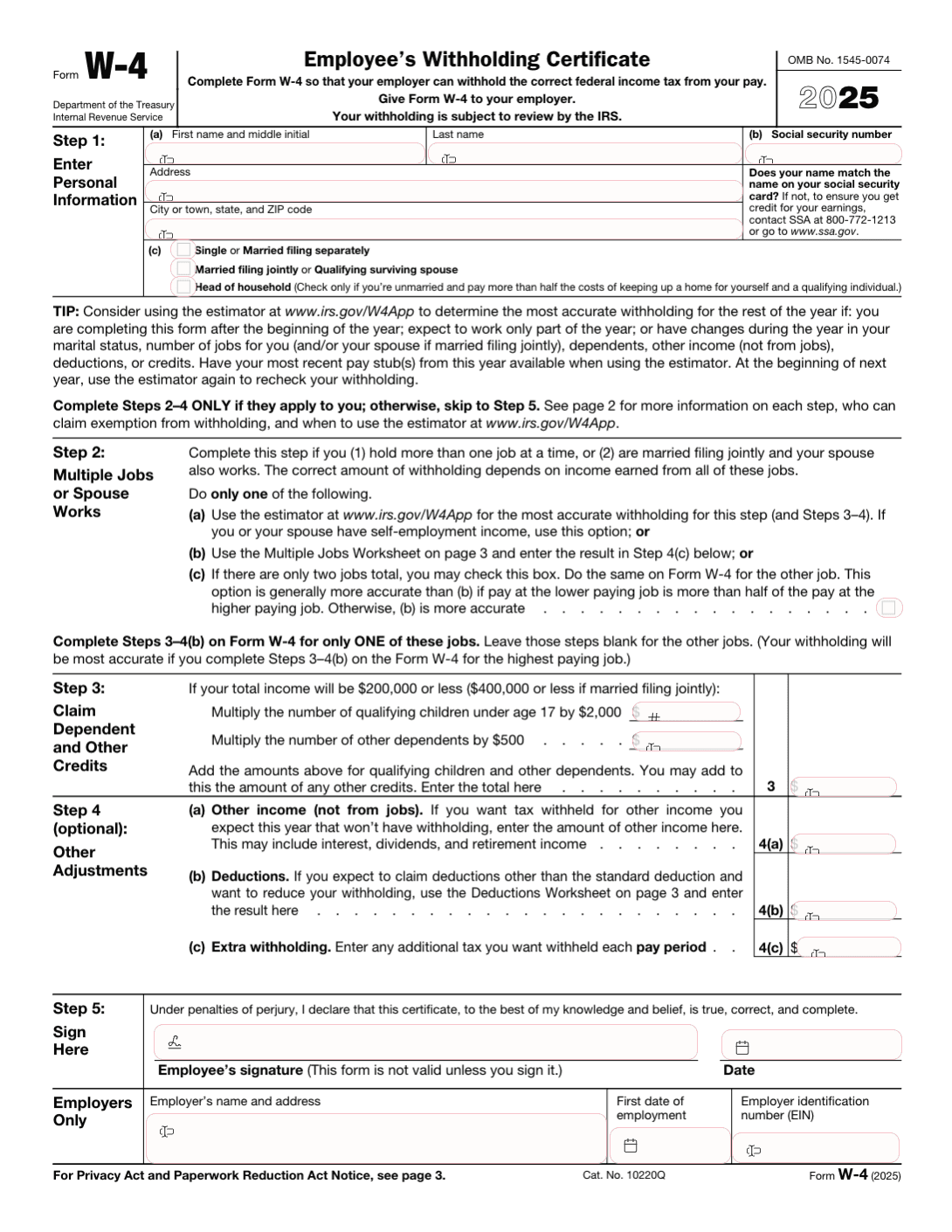
What Is IRS Form W-4?
IRS Form W-4, Employee's Withholding Certificate, tells your employer how much federal income tax to withhold from your paycheck. Submitting an accurate W-4 ensures you are not over-withheld (resulting in a large refund) or under-withheld (resulting in a tax bill and potential penalties).
For 2025, the IRS continues to use the redesigned W-4 format introduced in 2020, which eliminated withholding allowances and replaced them with a more straightforward approach.
When Do You Need to File a W-4?
You should submit a new Form W-4 when:
- Starting a new job -- your employer will ask you to complete one during onboarding
- Life changes -- marriage, divorce, having a child, or buying a home
- Income changes -- receiving a raise, starting a side job, or your spouse's employment status changes
- Tax bill or large refund -- you want to adjust withholding to better match your actual tax liability
- Annually -- it is good practice to review your W-4 each year
How to Fill Out Form W-4 for 2025
Step 1: Personal Information
Enter your name, address, Social Security number, and filing status. Your filing status (Single, Married Filing Jointly, or Head of Household) has a significant impact on your withholding.
Step 2: Multiple Jobs or Spouse Works
If you hold more than one job or are married filing jointly and your spouse also works, complete this step to avoid under-withholding. You can use the IRS Tax Withholding Estimator, the Multiple Jobs Worksheet, or check the box in Step 2(c) for a simpler approach.
Step 3: Claim Dependents
If your total income is $200,000 or less ($400,000 or less for married filing jointly), you can claim:
- $2,000 for each qualifying child under age 17
- $500 for each other dependent
Step 4: Other Adjustments (Optional)
- 4(a): Other income not from jobs (interest, dividends, retirement income)
- 4(b): Deductions beyond the standard deduction (itemized deductions, student loan interest)
- 4(c): Extra withholding per pay period if you want additional tax withheld
Step 5: Sign and Date
Sign and date the form, then submit it to your employer. Do not send Form W-4 to the IRS.
Fill Out Form W-4 Online with Popform
Popform simplifies the W-4 process with smart tools:
- AI-powered guidance explains each step in plain language
- Withholding estimator helps you determine the right amounts
- Error detection catches missing fields and common mistakes
- Instant download of your completed W-4 as a PDF
- Free to use with no account required
Frequently Asked Questions
Do I need to fill out a new W-4 every year?
No, your current W-4 remains in effect until you submit a new one. However, reviewing it annually is recommended to keep your withholding accurate.
What happens if I do not submit a W-4?
If you do not submit a W-4, your employer will withhold taxes as if you are single with no adjustments, which typically results in the highest withholding rate.
Can I claim exempt status on my W-4?
You can claim exemption from withholding if you had no tax liability last year and expect none this year. Write "Exempt" on line 4(c) and complete Steps 1 and 5. Exempt status must be renewed each year.
How do I adjust my W-4 if I have multiple jobs?
Use the IRS Tax Withholding Estimator at irs.gov or complete the Multiple Jobs Worksheet on page 3 of Form W-4 for the most accurate result.